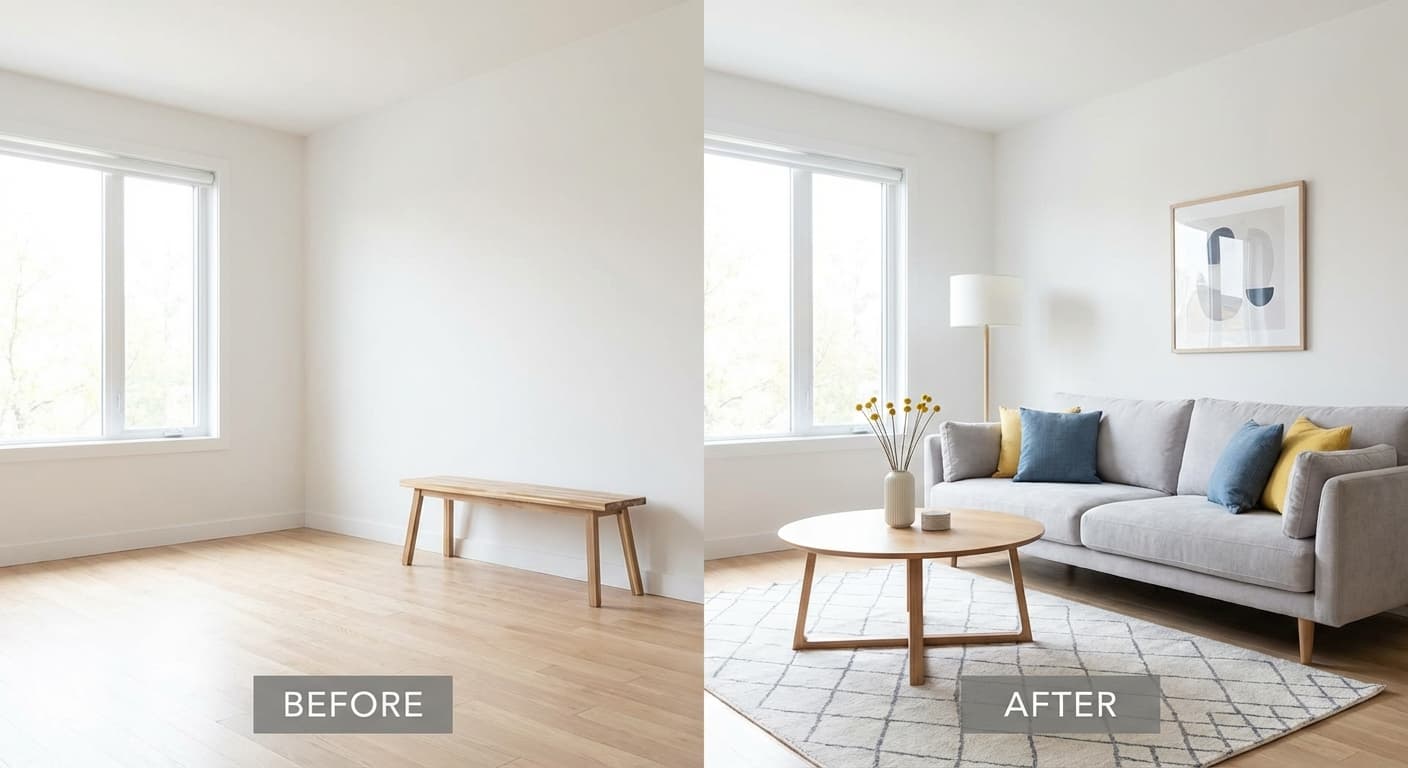
Warum KI Virtuelles Staging das Immobilienmarketing verändert
In einem Markt, in dem Käufer schnell scrollen und noch schneller entscheiden, übernehmen Ihre Exposé-Fotos den Großteil der Verkaufsarbeit. KI Virtuelles Staging verwandelt leere, veraltete oder überladene Räume in saubere, käuferfreundliche Bereiche – ohne ein einziges Sofa zu bewegen. Für Makler, private Verkäufer und Bauträger ist der größte Vorteil die Geschwindigkeit: schnellere Bearbeitungszeiten für Fotos, schnellere Markteinführung und oft schnellere Immobilienverkäufe durch KI, da der erste Eindruck entscheidend ist.
Was ist KI Virtuelles Staging (und wie unterscheidet es sich von traditionellem Staging)?
KI Virtuelles Staging ist der Prozess, bei dem künstliche Intelligenz eingesetzt wird, um Möbel, Dekoration, Lichtstimmung und manchmal kleinere Oberflächen in einem Immobilienfoto hinzuzufügen (oder zu ersetzen). Im Gegensatz zum physischen Staging – bei dem Sie Möbel mieten, Umzugsunternehmen beauftragen und den Zugang koordinieren – findet virtuelles Home Staging online statt, oft innerhalb von Minuten bis Stunden.
Wann KI-Staging die beste Wahl ist
Wann Sie es vermeiden sollten
Wenn Ihre Marketingstrategie die genaue Darstellung eingebauter Merkmale (z.B. maßgefertigte Einbauschränke) erfordert und Staging diese verdecken könnte, halten Sie die Bearbeitungen minimal. Vermeiden Sie auch unrealistische Transformationen, die als irreführend angesehen werden könnten – konzentrieren Sie sich auf Möbel und Dekoration, nicht auf strukturelle Änderungen, es sei denn, diese werden klar offengelegt.
Vorteile von virtuellem Staging, die die Exposé-Performance direkt verbessern
Das Ziel sind nicht „schöne Bilder“. Das Ziel ist eine messbare Performance: mehr Klicks, mehr Besichtigungen, stärkere Angebote und ein reibungsloserer Weg zum Abschluss. Im Folgenden finden Sie die konsistentesten Vorteile von virtuellem Staging, die von Maklern berichtet und durch Branchenberichte bestätigt werden.
1) Stärkerer erster Eindruck (höhere Klickrate und mehr Anfragen)
Käufer entscheiden anhand der ersten Fotos, ob sie eine Besichtigung buchen. KI-gestagte Bilder helfen Räumen, funktional zu wirken (Wohin kommt der Esstisch?) und emotional ansprechend zu sein (Könnte ich hier wohnen?). Praktische Tipps finden Sie in Realtor.coms Tipps zum KI Virtuellen Staging. 2) Schnellere Veröffentlichung (Geschwindigkeit = Vorteil)
3) Konsistentes Branding über mehrere Einheiten hinweg (Bauträger lieben das)
Für Bauträger verkauft Konsistenz: Eine einheitliche Stilistik über 10–100 Einheiten hinweg schafft Vertrauen und erleichtert den Vergleich. KI-Staging kann einen kohärenten „Look“ über verschiedene Grundrisse hinweg anwenden, während die Raumproportionen erhalten bleiben.
4) Besserer ROI als physisches Staging in vielen Szenarien
Wie KI-optimierte Immobilien-Exposés Ihnen helfen, schneller zu verkaufen (Praktische Käuferpsychologie)
Die meisten Käufer haben Schwierigkeiten, Maßstab und Layout in leeren Räumen zu visualisieren. KI-gestagte Fotos reduzieren Unsicherheiten, indem sie stillen Fragen beantworten: „Passt mein Sofa hierher?“, „Wohin kommt das Bett?“, „Gibt es Platz für einen Schreibtisch?“ Aus diesem Grund generieren KI-optimierte Immobilien-Exposés oft qualifiziertere Anfragen – von Personen, die bereits verstehen, wie das Zuhause funktioniert.
Ein einfacher Workflow: Vom Rohfoto zum exposéfertigen Bild in Minuten
Schritt 1: Die richtigen Ausgangsfotos aufnehmen
KI-Staging funktioniert am besten mit hellen, geraden Fotos. Verwenden Sie ein Stativ, fotografieren Sie mit geraden vertikalen Linien und vermeiden Sie extreme Weitwinkelverzerrungen. Halten Sie den Raum aufgeräumt – selbst wenn er leer ist, entfernen Sie Kabel, Behälter und Reinigungswerkzeuge.
Schritt 2: Wählen Sie einen Stil, der zu Ihren Käufern passt
Passen Sie den Staging-Stil an den Preispunkt und die Nachbarschaft an. Zum Beispiel: modern-minimalistisch für Stadtwohnungen, warm-traditionell für Familienhäuser und klar-zeitgenössisch für Neubauten. Trendnotizen und Stilrichtungen finden Sie in Quellen wie Houzz zu KI Virtuellem Staging Trends. Schritt 3: Zuerst die wichtigsten Räume inszenieren (nicht übertreiben)
Schritt 4: Vorher/Nachher-Paare hinzufügen, um Vertrauen aufzubauen
Vorher/Nachher-Bilder reduzieren Skepsis und erhöhen die Transparenz. Sie eignen sich auch hervorragend für soziale Medien und Exposé-Präsentationen, da sie den Mehrwert des Staging visuell belegen.
Schritt 5: Mit klarer Offenlegung veröffentlichen
Viele MLS- und Werbestandards erfordern eine Offenlegung, wenn Bilder virtuell gestagt wurden. Fügen Sie einen einfachen Hinweis wie „Virtuell gestagt“ in der Fotobeschreibung oder den Exposé-Bemerkungen hinzu. Dies schützt Sie und hält die Erwartungen der Käufer im Einklang, was für einen reibungslosen Verkaufsprozess entscheidend ist.
Messung eines höheren ROI durch Virtuelles Staging: Was Sie verfolgen sollten
Um einen höheren ROI durch Virtuelles Staging nachzuweisen, verfolgen Sie Kennzahlen vor und nach der Einführung von KI-Staging. Sie benötigen keine perfekte Attribuierung – lediglich eine konsistente Messung der wichtigsten Indikatoren.
Best Practices: KI Virtuelles Staging realistisch gestalten (Nicht „zu perfekt“)
Realistische Maßstäbe und Laufwege verwenden
Nichts untergräbt das Vertrauen schneller als ein Sofa, das eine Tür blockiert. Wählen Sie Layouts, die Laufwege und typische Möbelgrößen respektieren. Im Zweifelsfall ist weniger Staging oft mehr, um Authentizität zu bewahren.
Lichtrichtung und Schatten abstimmen
Gutes KI-Staging sollte das natürliche Licht des Raumes respektieren. Wenn Ihr Raum Fensterlicht von links hat, sollten die Möbelschatten entsprechend ausgerichtet sein. Dies ist ein entscheidender Qualitätscheck für professionell aussehende Ergebnisse, die überzeugen.
Materialien passend zum Preissegment wählen
Luxuriöses Staging in einer Einsteigerwohnung kann irreführend wirken. Streben Sie nach „anspruchsvoll, aber glaubwürdig“. Dies ist zentral für nachhaltiges KI im Immobilienmarketing – Sie möchten mehr Besichtigungen, nicht mehr Enttäuschungen bei potenziellen Käufern.
Compliance, Ethik und Vorschriften: Was Makler und Verkäufer wissen sollten
KI-Bearbeitungen sind Marketing – können aber in die Irreführung übergehen, wenn sie Mängel verbergen oder die Immobilie wesentlich verändern. Befolgen Sie Ihre lokalen MLS-Regeln und legen Sie virtuelles Staging offen. Für den regulatorischen Kontext (insbesondere in der EU) verfolgen Sie Updates wie die Berichterstattung des Europäischen Parlaments zu KI-Vorschriften. Anwendungsfälle für KI Virtuelles Staging für Makler, private Verkäufer und Bauträger
Immobilienmakler: Mehr Aufträge gewinnen und Vermarktungsdauer verkürzen
Private Verkäufer: Mit professionell vermarkteten Objekten konkurrieren
Wenn Sie privat verkaufen, kann Staging den Unterschied zwischen „sieht nach einem Projekt aus“ und „einzugsbereiter Atmosphäre“ ausmachen. KI-Staging bietet Ihnen professionelle Visualisierungen, ohne Mietmöbel und Umzugsunternehmen koordinieren zu müssen, was Zeit und Kosten spart.
Bauträger: Einheiten vorvermarkten und Marketing skalieren
KI-Staging ist besonders effektiv für Neubauten: Zeigen Sie möblierte Lifestyle-Bilder, bevor die Einheit vollständig fertiggestellt ist (solange Sie dies offenlegen und die Ausstattungsmerkmale korrekt bleiben). Dies unterstützt eine schnellere Vermarktung und ein konsistentes Branding über alle Kampagnen hinweg.
Empfohlene KI-Tools für Immobilien-Exposés (Worauf Sie achten sollten)
Nicht jede Immobilien-KI-Technologie ist gleich. Wählen Sie Tools, die Realismus, korrekten Maßstab und einfache Überarbeitungen priorisieren. Ein Beispiel für einen etablierten Bearbeitungsdienstleister, der KI-Optionen anbietet, ist BoxBrownies KI Virtuelles Staging Tool. So starten Sie mit HomestagingKI (2 Bilder kostenlos)
HomestagingKI ist auf Geschwindigkeit und Klarheit ausgelegt: Laden Sie Ihr Foto hoch, wählen Sie einen Stil und erhalten Sie saubere Vorher/Nachher-Ergebnisse – ideal für Makler, die schnelle Exposé-Upgrades benötigen, und Verkäufer, die eine professionelle Präsentation ohne das Budget für physisches Staging wünschen.
Wenn Sie KI Virtuelles Staging an einem echten Exposé testen möchten, beginnen Sie mit Ihrem wichtigsten Raum (meist dem Wohnzimmer). Sie können es mit dem Angebot ausprobieren: Homestage kostenlos (2 Bilder gratis). Preise ansehen und Ihre kostenlosen Bilder starten. Video: Erfahren Sie, wie KI-Staging Verkäufe beschleunigt und den ROI verbessert
Wie KI Virtuelles Staging Immobilienverkäufe beschleunigt
Dieses Video würde detailliert erklären, wie KI-Tools für virtuelles Home Staging funktionieren und welche spezifischen Vorteile sie in Bezug auf den Return on Investment (ROI) bieten. Es würde aufzeigen, wie durch den Einsatz von KI die Kosten für traditionelles Staging gesenkt und gleichzeitig die Attraktivität der Immobilienangebote gesteigert werden können, was zu schnelleren Verkäufen und höheren Erlösen führt. Typische Themen wären die Analyse von Kennzahlen wie Klickraten, Besichtigungsanfragen und die Verkürzung der Vermarktungsdauer.
FAQ: KI Virtuelles Staging in der Immobilienbranche
FAQ
Ist KI Virtuelles Staging in MLS-Exposés erlaubt?
Oft ja, aber die Regeln variieren je nach MLS und Land. Der sicherste Ansatz ist, offenzulegen, dass Bilder virtuell gestagt wurden, und Bearbeitungen zu vermeiden, die die Immobilie wesentlich verändern (z.B. das Hinzufügen von Fenstern oder das Entfernen von Mängeln). Es ist ratsam, die spezifischen Richtlinien Ihrer lokalen Immobilienbörse zu prüfen.
Funktioniert virtuelles Home Staging auch für bewohnte Immobilien?
Ja. Es kann ablenkende Möbel durch einen saubereren Stil ersetzen. Für beste Ergebnisse sollten Sie mit aufgeräumten Fotos und guter Beleuchtung beginnen, damit die KI die Raumgeometrie präzise beibehalten kann und ein realistisches Ergebnis erzielt wird.
Wie viele Fotos sollte ich stagieren?
Für die meisten Exposés sind 6–12 gestagte Bilder ausreichend. Inszenieren Sie die Räume, die den Lebensstil verkaufen: Wohnzimmer, Hauptschlafzimmer, Ess-/Küchenbereich und einen flexiblen Raum wie Büro oder Gästezimmer. Eine Überladung mit zu vielen gestagten Bildern kann kontraproduktiv sein.
Was ist der größte Faktor für den ROI von virtuellem Staging?
Geschwindigkeit und Qualität. Eine schnellere Bearbeitung hilft Ihnen, früher zu starten, und qualitativ hochwertigere Bilder verbessern das Engagement der Interessenten. Verfolgen Sie Kennzahlen wie die Tage bis zur ersten Besichtigung, die Anzahl der Anfragen und das Verhältnis von Listenpreis zu Verkaufspreis, um den genauen Einfluss zu quantifizieren und den ROI zu belegen.
Kann KI-Staging den Verkaufspreis erhöhen?
Es kann einen stärker wahrgenommenen Wert unterstützen und Preisreduzierungen verringern, indem es die Präsentation und das Vertrauen der Käufer verbessert. Die Ergebnisse hängen von den Marktbedingungen, der Preisstrategie und der zugrunde liegenden Qualität der Immobilie ab. Studien zeigen, dass gestagte Immobilien oft schneller und näher am Angebotspreis verkauft werden.
Fazit: Nutzen Sie KI Virtuelles Staging, um schneller zu verkaufen und smarter zu vermarkten
KI-Staging geht nicht darum, eine Immobilie „vorzutäuschen“ – es geht darum, ihr Potenzial klar und schnell zu kommunizieren. Wenn es ethisch korrekt und realistisch durchgeführt wird, verbessert KI Virtuelles Staging die Qualität der Exposés, reduziert Marketing-Reibungsverluste und kann einen starken ROI von virtuellem Staging für Makler, Verkäufer und Bauträger gleichermaßen liefern.